Every pane, every agent. Prompts become buttons.
Workspaces, worktrees and panes, mirrored as projects with their branches.
[ iPhone app · for the agents on your computer ]
Claude Code, Codex and every other agent on your computer — answered from your iPhone.
herdr · tidepool · claude

$0
[ 02 · Works with ]
Panegrip doesn’t replace your setup with a hosted runner. One small relay on your computer reads the agents you already run and sends your answers back.
Workspaces, worktrees and panes, mirrored as projects with their branches.
Orca’s worktrees become projects, its agents your chats. Make Orca the main app and new projects and terminals open there.
T3 threads join your projects. Plan on the train, implement in one tap.
Agents in tmux, zellij, cmux and Ghostty show beside Herdr’s, and so does Claude in VS Code. Each app is watched on its own, so a slow one never holds up the rest. Setup for each →
Works with Herdr, Orca, T3 Code, tmux, zellij, cmux, Ghostty and VS Code. How to set up each →
Agents it understands
[ 03 · The app ]
On your computer
› Answered from the phoneesc
On your phone
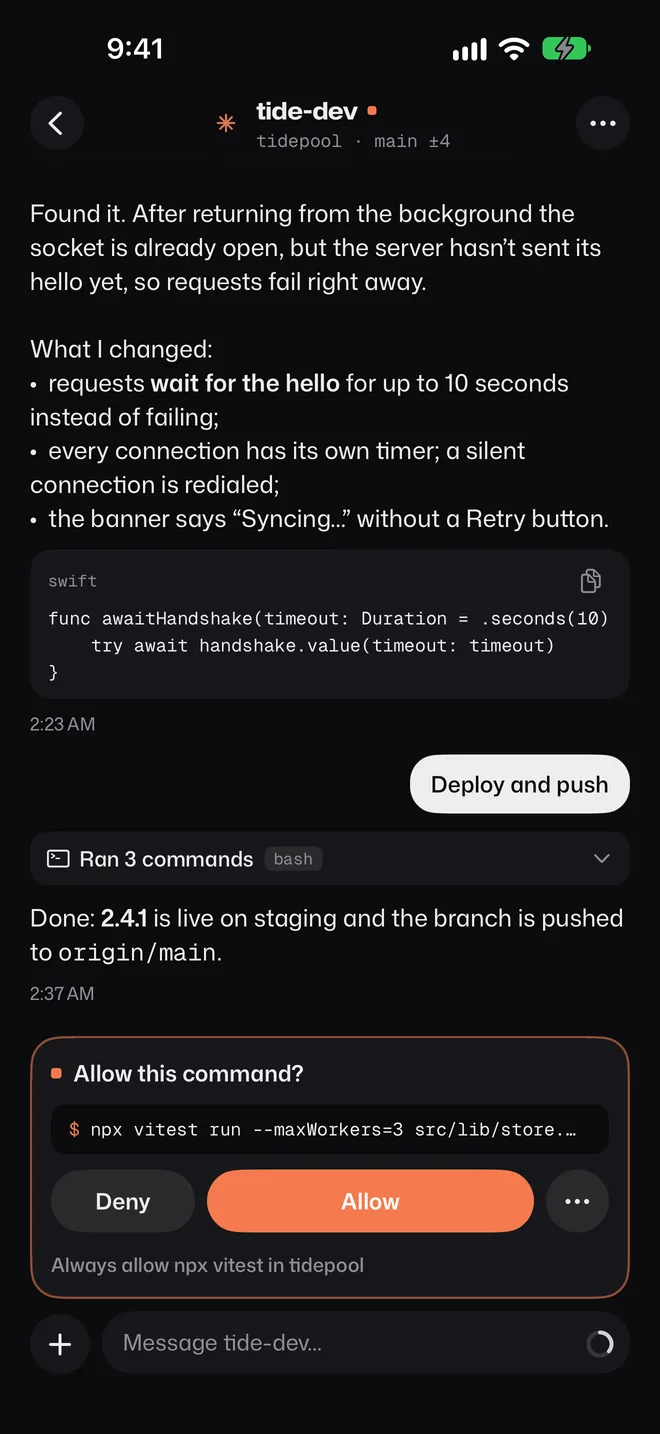
Same session, right now · no wrapper chat, no copy of your work
[ 04 · Lock screen ]

msThe computer gets your answer in milliseconds. Our servers never see the notification text.
Download on theApp Store[ 05 · Control room ]
Built for the moments you’re away — limits, queues, scripts, models and a digest of what happened.
Usage & cost · 14 days
Each Claude account’s 5-hour and weekly windows, and when they reset.
Hit the limit at 2 a.m.? The work picks back up the second it resets.
2:39:58
Line prompts up — the computer sends the next one the moment the agent is free.
The logo is a status light: working, waiting for you, done.
[ 06 · Privacy ]
Your phone talks to your computer directly whenever the network allows. When it can’t, relay.panegrip.dev forwards end-to-end encrypted packets it cannot read.
Keys stay in your iPhone’s Keychain and on your computer.
The relay sees device keys and traffic volume — never your code, prompts or terminals.
[ who sees what ]
| Who | Sees | Never sees |
|---|---|---|
| relay.panegrip.dev | Device keys, IP addresses, when and how much data flows | Your code, prompts, replies, terminals |
| Apple push | A generic line; on the Live Activity, project and agent names and their state | Notification text — sealed with AES-256-GCM for your phone only |
| Soniox | Your voice while you dictate, with project and agent names as hints | An account key — the phone only ever holds a one-time key |
| Panegrip voice keys | A random key for this install, proven by App Attest, and how many voice keys it took each day | Your voice or what you said |
| A guest in a shared chat | That one chat, writing or approving only if you allow | Other agents, files, terminals, previews, shell commands |
| Us | No accounts, no analytics — only the counts above | Your work, ever |
Keys are made on your devices and never leave them. Compare them any time: Settings → Encryption and privacy on the phone, panegrip-relay status on the computer.
[ 07 · Install · two minutes ]
One command on the Mac or Linux computer your agents run on. The installer checks the archive’s SHA-256 first.
[ 08 · FAQ ]
“$0. No account. End-to-end encrypted, even push.”
No. Your phone talks to your computer directly whenever the network allows. When it can’t, relay.panegrip.dev forwards end-to-end encrypted packets it cannot read. Notification text is encrypted on your computer for your phone only.
Who sees whatNone in particular: keep running your agents where you do. Panegrip works with Herdr, Orca, T3 Code, tmux, zellij, cmux, Ghostty and Claude in VS Code, any of them or several at once, and puts their agents in one list. One of them is your main app: new projects and terminals from the phone open there. Setup for each →
Claude Code, Codex, OpenCode, Gemini CLI, Pi, Kimi, Qoder, Cursor and others, plus plain shells, wherever they run; the agents Orca runs in its terminals; and the agents T3 Code drives. Chats are read from Claude Code’s and Codex’s own transcripts; approvals and questions are understood for the major ones; everything else is a live terminal.
No. If your computer has a Soniox key, the phone uses it; otherwise Panegrip’s server hands your phone a one-time key for each recording. The audio goes from your phone straight to Soniox.
Nothing. No subscription, no account, no ads.
Not yet — Panegrip is a native iPhone app first.